**<H1>Python 3.14 Features That Matter for Modern Python Development</H1>**

**<h2>Introduction</h2>**
The latest version 3.14, of the programming language was released by Python on October 7, 2025, and features meaningful improvements that will help you write better and more efficient code. The latest version includes changes in concurrency, typing, strings, and debugging modules. While some of the improvements make your code easier to read, others will make you change your views about the Python interpreter.
Thus, if you are interested in pursuing [Python Online Course](https://www.cromacampus.com/courses/online-python-training-in-india/), this release provides an excellent benchmark. Actually, this article avoids the buzzwords and goes straight into the details. So, for instance, the fact that Python "removed the GIL for everyone" is not entirely accurate. Find out what the real story behind Python 3.14 is below.
**<h3>Free-Threaded Python Moves Beyond the GIL</h3>**
In the traditional version of CPython, there is a mechanism called the Global Interpreter Lock or the GIL. This GIL ensures that only one thread executes Python code at any point in time. Therefore, applications which have a heavy reliance on the CPU cannot use multiple cores even on powerful computers.
But Python 3.14 provides official support for a free-threaded version of Python by PEP 779, where Python does not employ the GIL.
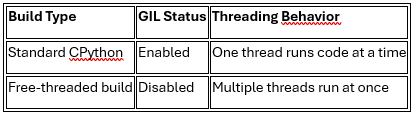
Still, this build stays optional for now, not the default. You must choose it deliberately when you build or install Python.
**<h3>Template Strings Give You More Control</h3>**
Next, Python 3.14 introduces template string literals through PEP 750. These use familiar t-string syntax, much like the f-strings you already know.
python
planet = "Earth"
sentence = t"We live on {planet}"
print(sentence)
But unlike f-strings, a t-string returns a structured Template object. This object keeps static text and interpolated values separate, instead of merging them right away. As a result, libraries gain more control over how they process interpolated values. This helps when you build custom templating or transformation tools. However, a t-string alone does not make SQL or HTML automatically safe.
**<h3>Deferred Annotations Change How Type Hints Work</h3>**
Type hints already help you write safer, clearer code. Now, Python 3.14 changes how it evaluates annotations through PEP 649 and PEP 749. Before, Python evaluated annotations right away, the moment you defined a function. Now, Python defers that evaluation until something actually needs it.
**Here's what this means for you:**
• Forward references become much easier to write correctly
• Runtime work drops when you never inspect the annotations
• A new annotationlib module helps you inspect deferred annotations
Overall, this change helps most in large projects with complex type hints.
**<h3>Multiple Interpreters Bring New Concurrency Options</h3>**
Python 3.14 also adds standard library support for subinterpreters, through PEP 734. The new concurrent. interpreters module makes this feature easy to use, without touching the C API. Think of it this way: one process can now host several isolated interpreters. Each interpreter keeps its own state, separate from every other one.
**Here are a few practical details to remember:**
• Interpreters stay isolated by default, with no shared state
• Python creates no implicit threads on its own
• Not every PyPI package supports multiple interpreters yet
So, this feature suits workloads that need isolated execution, without heavy process overhead.
**<h3>Better REPL and Clearer Error Messages</h3>**
Most debugging starts in the interactive shell, so Python 3.14 improves that experience directly. Now, the REPL highlights your syntax in colour as you type.
Error messages also got much clearer overall. For instance, if you compare tools during a [Python Course in Delhi](https://www.cromacampus.com/courses/python-training-in-delhi/), you'll notice debugging feels faster now. Syntax errors often include helpful suggestions, instead of vague, generic messages.
**<h3>Zstandard Joins the Standard Library</h3>**
Compression support also became more convenient for everyday projects. Python 3.14 adds compression.zstd through PEP 784, so you get native Zstandard support.
Additionally, the new compression package organises existing modules under one clear namespace. This includes support for reading and writing Zstandard archives through tarfile, zipfile, and shutil.
**<h3>The Experimental JIT Opens a New Performance Path</h3>**
Python 3.14 has also added an experimental just-in-time compiler for Windows and macOS. Yet do not use it in production environments at the moment. As you can see, the performance is highly dependent on the load. It can work 10% slower or 20% faster depending on what code you have. There is one more important point worth mentioning: free-threaded builds do not work with JIT yet.
**<h3>Safer Remote Debugging Capabilities</h3>**
Python 3.14 introduces a zero-overhead external debugger interface through PEP 768. This lets debuggers and profilers attach safely to a running process. So, you no longer need to restart or stop the application to inspect it. Asyncio also gains new tools for checking running tasks. Now, you can inspect live processes using simple commands like python -m asyncio ps.
**<h3>Python 3.14 vs Python 3.13</h3>**
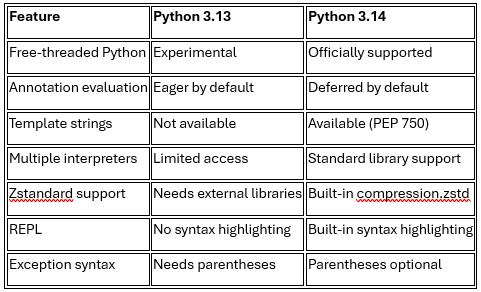
Clearly, this comparison shows how much changed in just one release.
**<h3>Which Features Should You Learn First</h3>**
Not every feature deserves your attention right away. Some feel foundational, while others stay useful but situational for most projects.
**So, try this learning order instead:**
1. Start with deferred annotations, since they affect everyday type hinting
2. Then explore free-threading concepts, even without switching builds yet
3. Next, try template strings, once you build custom text-processing logic
4. Later, study multiple interpreters for advanced concurrency scenarios
5. Finally, learn the new debugging tools, for when things break in production
Meanwhile, many structured [Python Training in Noida](https://www.cromacampus.com/courses/python-training-in-noida/) programs will likely add these topics soon. Still, understanding why each change happened matters more than memorising syntax.
**<h2>Conclusion</h2>**
Python 3.14 builds around real developer needs, not just version numbers. Free-threading, template strings, and deferred annotations mark the biggest shifts here. Multiple interpreters and better debugging tools round out this genuinely useful update. You won't need to rewrite old code overnight, though. Instead, you now get better tools to write clearer, faster Python going forward.